A mod for Claude Code

Review Claude's plan before it writes code

Plan Crutches opens the plan from plan mode as a review page in your browser. You see the change tree, the signatures of new and changed methods and a diff against your files. You comment on anything you select, tick files as OK and press Submit. Claude revises the plan, or starts the implementation when nothing is pending.

Open source, MIT license · Claude Code 2.1.275 or newer · Node 18 or newer

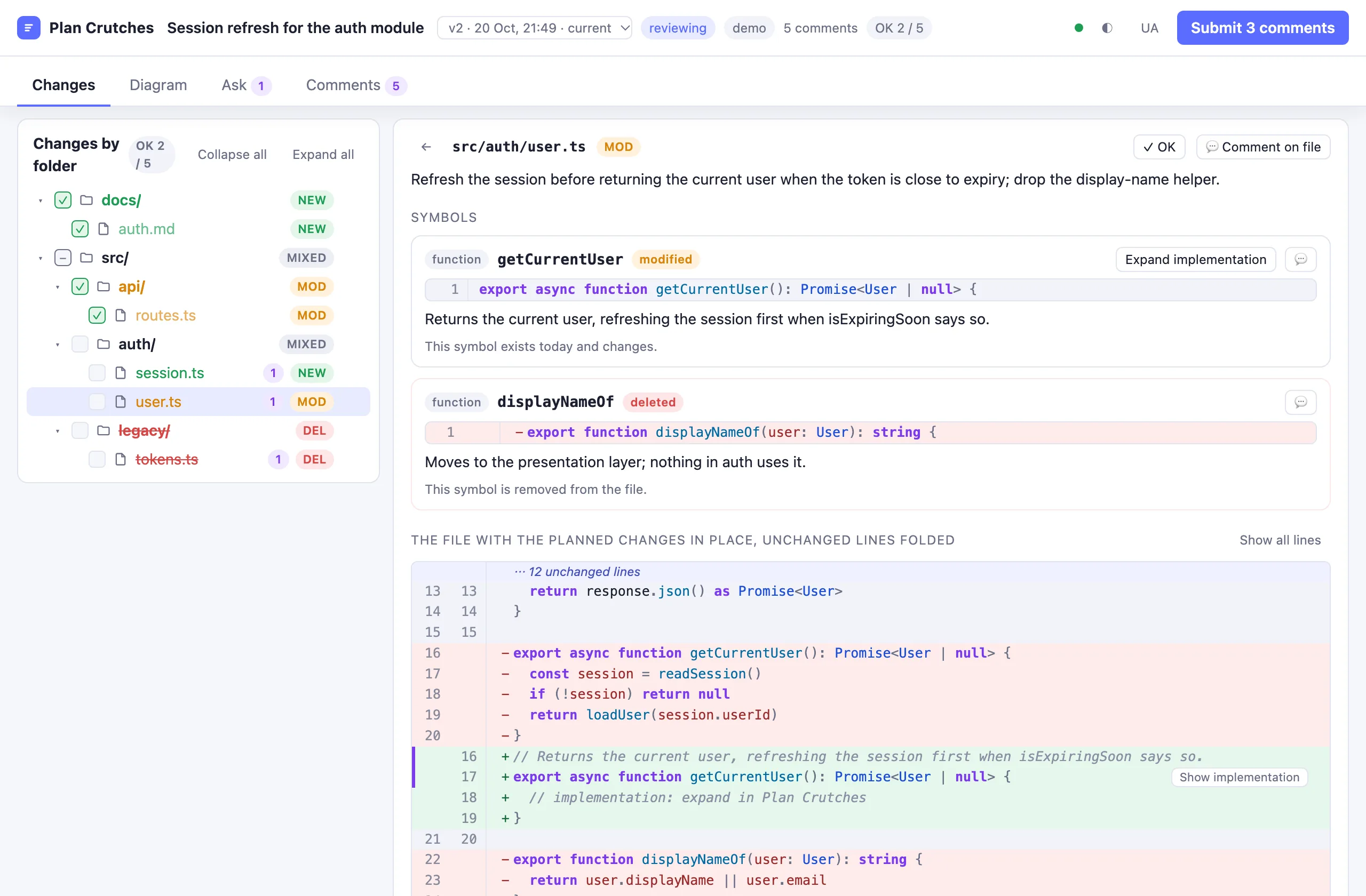
The review page: the header with the plan title, the version list, the review status, the count of comments and OK files and the Submit button; the Changes tab with the change tree on the left and the file src/auth/user.ts on the right, where the modified method getCurrentUser shows as removed and added lines and the deleted method displayNameOf as removed lines.
The review page with the demo plan: the change tree with OK marks and comment counts, a modified file with its git-style diff, and three comments ready to go back to Claude.

Plan mode gives you a Markdown file and a Yes button

A plan for a real task names a dozen files and twice as many methods. Plan Crutches turns that text into a change you can read like a pull request, before any of it exists.

newmoddel

See the shape of the change

Every folder, file and symbol the plan touches, marked new, modified or deleted. A changed method shows as a git-style diff: its current code as removed lines, the planned code as added lines.

commentv2

Say exactly what to change

Select a signature, a line of the diff or a sentence of the summary and comment on it. Submit sends the comments to Claude as the next message. The next version of the plan marks them resolved.

127.0.0.1files

A local page and plain files

The page is plain HTML served on 127.0.0.1 by a small Node server. Every comment, version and record is a file under ~/.claude/plan-crutches, so a review survives a restart of Claude Code.

How it works

The mod sits between plan mode and the implementation. It intercepts the moment Claude leaves plan mode and holds it until you are done.

You start plan mode

Give Claude a task as usual. The mod adds one instruction to the plan mode reminder.

Claude writes the plan

The plan file ends with a plan-crutches JSON block that lists every file and marks every symbol as new, modified or deleted.

The page opens

When Claude calls ExitPlanMode, the mod reads the plan file, starts the page server, opens the page and tells Claude to wait.

You review

Open files, tick them as OK, comment on folders, files, symbols or selected text, ask questions, build the diagram.

Submit sends the comments

Your comments go to Claude as the next message. Claude updates the plan file and calls ExitPlanMode again. The page shows version 2 with your comments resolved.

Submit with nothing pending approves

Claude Code shows its own plan dialog once. Press Yes there and the implementation starts.

Steps 4 and 5 repeat until nothing is pending. When every file is marked OK and no comment waits, the Submit button becomes Approve plan:

The page header with the badge OK 5 / 5 and the button Approve plan.

What is on the page

Four tabs: Changes, Diagram, Ask and Comments. The header and the tabs stay at the top while you scroll. Every screenshot below is the demo plan that ships with the mod.

Changes by folder, with OK marks

The tree shows every folder and file the plan touches, its status and the number of comments on it. Click a file to open it, click the speech bubble to comment on it.

Tick a file as OK when it needs no comments. The box of a folder ticks every file under it. When a new version changes a file, the mod clears its OK mark, so nothing changed slips through unseen. The header counts the OK files.

The change tree: folders docs/ and src/ with their files, OK boxes ticked on docs/auth.md and src/api/routes.ts, comment counts on session.ts, user.ts and tokens.ts, and the chips NEW, MOD, DEL and MIXED.

Signatures and git-style diffs

A file view lists each symbol with its highlighted signature and what the plan does to it. Below them, the whole file with the planned changes in place and the unchanged lines folded: one row stands for each run of them, and a click opens it. A modified method appears as git shows it: its current code as removed lines, the planned signature as added lines. A deleted method appears as removed lines only.

Before you ask for an implementation, the file shows only the planned signatures. Expand implementation asks the model for the body of a symbol. The generated code takes the place of the stub right there in the file, under the removed lines, and you can comment on its lines.

The file view of user.ts folded to its changes: one row stands for the twelve unchanged lines above, then the current getCurrentUser as five removed lines, the planned signature as added lines with a Show implementation button, and the deleted displayNameOf as removed lines.

Comment on anything you select

Select text with the mouse in a code block, the summary, the task or an answer. A popup opens next to the selection. A code comment keeps the line range and the selected text, and the lines stay marked in the diff.

Folders, files and symbols have their own comment buttons. Every comment is kept in the session state and in a Markdown record. Submit lists the pending comments and the OK files in the message to Claude.

Two added lines of the diff are selected. A popup titled selection, src/auth/user.ts, 2 lines selected quotes them and shows the tabs Comment, Ask and Explain with a comment typed in the Comment tab.

Explain and Ask, right there

The same popup has two more tabs. Explain says what the selected place is, where it sits in the project and why the plan changes it, in the language you write in. The request goes out only when you open the tab, and the same place is explained once per version.

Ask starts a thread about the selection. Claude answers in the popup with the selection and its place as context, and you continue the conversation there. Add the conversation to a comment turns the thread into a comment on the same lines.

The popup on the same selection with the Explain tab open: three paragraphs headed What, Where and Why, and the buttons Explain again, Ask about it and Close.

Questions become threads

The Ask tab of the page answers from the plan and the session without changing either. Every question is a thread: Reply continues it with the earlier turns as context. A thread shows where it came from and the selected text, and it can become a comment.

Answered threads go into the Markdown record of the review.

The Ask tab: a question box, then a thread from src/auth/user.ts lines 16 to 17 with a question, an answer, a follow-up question, its answer, the button Add the conversation to a comment and a reply box.

A 3D diagram of the change

Generate change diagram starts a clean session with read-only tools. It gets the plan, reads the project and answers with a graph. The page draws one block per planned file, colored by its status, with the symbols the plan changes and the calls between them.

Click a symbol to see every place in the project that calls it, in existing code too. Drag the board to rotate it, Shift and drag to pan, the wheel to zoom, 2D to flatten. Drag a block to move it. Save as SVG writes the diagram next to the Markdown record.

The Diagram tab: a tilted board with blocks for session.ts, user.ts, auth.md, routes.ts and tokens.ts, arrows for the calls between their symbols, and the callers of getCurrentUser drawn as grey blocks for handlers.ts, Header.tsx, Profile.tsx and 23 other callers.

Versions: see what changed, bring one back

Every version of the plan is saved. Highlight changes shows the summary as a text diff against an earlier version and marks each file and symbol in the tree as added, changed or removed. A file the new version dropped stays as a crossed-out row.

The version list in the header opens an earlier version read-only. Bring this version back writes it into the plan file as the next version. The Comments tab lists every comment by state, the versions and the history of the review.

Highlight changes is on: the summary shows 30 as removed text and 60 as added text, the tree carries chips added, changed and removed, middleware.ts is crossed out, and the symbol getCurrentUser shows its earlier description struck through.
The Comments tab: three pending comments, two resolved comments from version 1, the versions v2 current and v1 with the buttons open, Highlight changes and Bring this version back, and the review history.

Edit the summary, keep your wording

Press Edit on the summary, change the text and Save to the plan. The text goes into the plan file, and the next revision prompt tells Claude to keep your wording. The task block above the summary shows the raw task, from the Jira issue Claude fetched or from your prompt.

The summary card in edit mode: a text area with the summary Markdown and the buttons Cancel and Save to the plan.

And the rest

A review survives a restart

Resume the session and the review comes back on its own. In a new session in the same folder, /plan-review restore brings it back: the plan, the comments, the questions and the diagram.

Any plan file

/plan-review open <path> reviews a Markdown plan file without plan mode: a plan from an earlier session under ~/.claude/plans/, or one you wrote by hand.

A Markdown record

Every reviewed plan is recorded as Markdown under ~/.claude/plan-crutches/<project>/, with every version of the plan and the SVG of the diagram next to it.

Light, dark, EN, UA

The page follows your system theme or the toggle in the header, and speaks English or Ukrainian. The colors are CSS variables you can override in web/custom.css. The pane in Claude Code stays as a second view with the page link.

Install

The repository is its own plugin marketplace. One command adds the marketplace and the plugin.

In a Claude Code terminal session

/plugin install plan-crutches --marketplace s-rybak/plan-crutches

Claude Code asks to add the marketplace. Answer y, then pick a scope. The user scope loads the mod in every project.

From a shell

claude plugin install plan-crutches --marketplace s-rybak/plan-crutches

In the desktop app

Click + next to the prompt box, then Plugins, then Add marketplace with s-rybak/plan-crutches, then Add plugin.

Update

claude plugin update plan-crutches

Then /reload-plugins in a session. A session keeps the mod it loaded at its start, so start a new session after an update.

What it needs

  • Claude Code 2.1.275 or newer.
  • Node 18 or newer on the machine where the session runs. The page server runs there and binds to 127.0.0.1 only.
  • A browser. The page opens in the browser pane of the Claude desktop app when there is one, else in the system browser.

Try the page without plan mode

In a session with the mod installed:

/plan-review demo

Or from a clone of the repository, without the mod:

node scripts/demo-server.mjs

Then open http://127.0.0.1:4818/?t=demo. The demo server answers the page itself, with canned answers in place of the model.

Security of the page

The server answers only requests whose Host header names the local machine, and every API call carries a token made once per session. Project files are served under the same token, never from outside the project folder.
Reference

The commands of the mod and its options. Set the options in /config or in settings.json under pluginConfigs.plan-crutches.options.

Commands

CommandWhat it does
/plan-reviewIf the page server is not running, starts it. Opens the page and the pane.
/plan-review demoLoads a demo plan so you can try the page without plan mode.
/plan-review open [path]Opens a plan file for review without plan mode. With no path, it opens the plan file of this session, or else the newest file under ~/.claude/plans/. The same file under review gets the next version and keeps the comments.
/plan-review urlPrints the page address with its token.
/plan-review restoreBrings back the stored review of this folder: the plan, the comments, the questions and the diagram.
/plan-review closeCloses the pane. The page keeps running.
/plan-review stopStops the page server.
/plan-review resetClears the review state.

Options

OptionDefaultMeaning
languageenPage and pane language, en or uk.
modelsonnetModel for the light calls: plan structure extraction, the pick of project files for an implementation, the change diagram and its callers, and answers without a session fork.
bodyModelopusModel that writes method bodies. Empty means the model option.
plansDir~/.claude/plan-crutchesFolder for the Markdown records and SVG files. A path under ~ or an absolute path is shared, with one subfolder per project. A relative path is a folder inside the project.
summaryLimit9000Characters of the summary shown before Show all.
port4817Port of the page server on 127.0.0.1. A taken port falls back to a free one.
openInautoWhere the page opens: auto tries the Claude desktop browser pane, then the system browser. system uses the system browser. none only shows the link.
nodePathemptyPath of the node executable. Empty means node from PATH, then the usual install locations.